
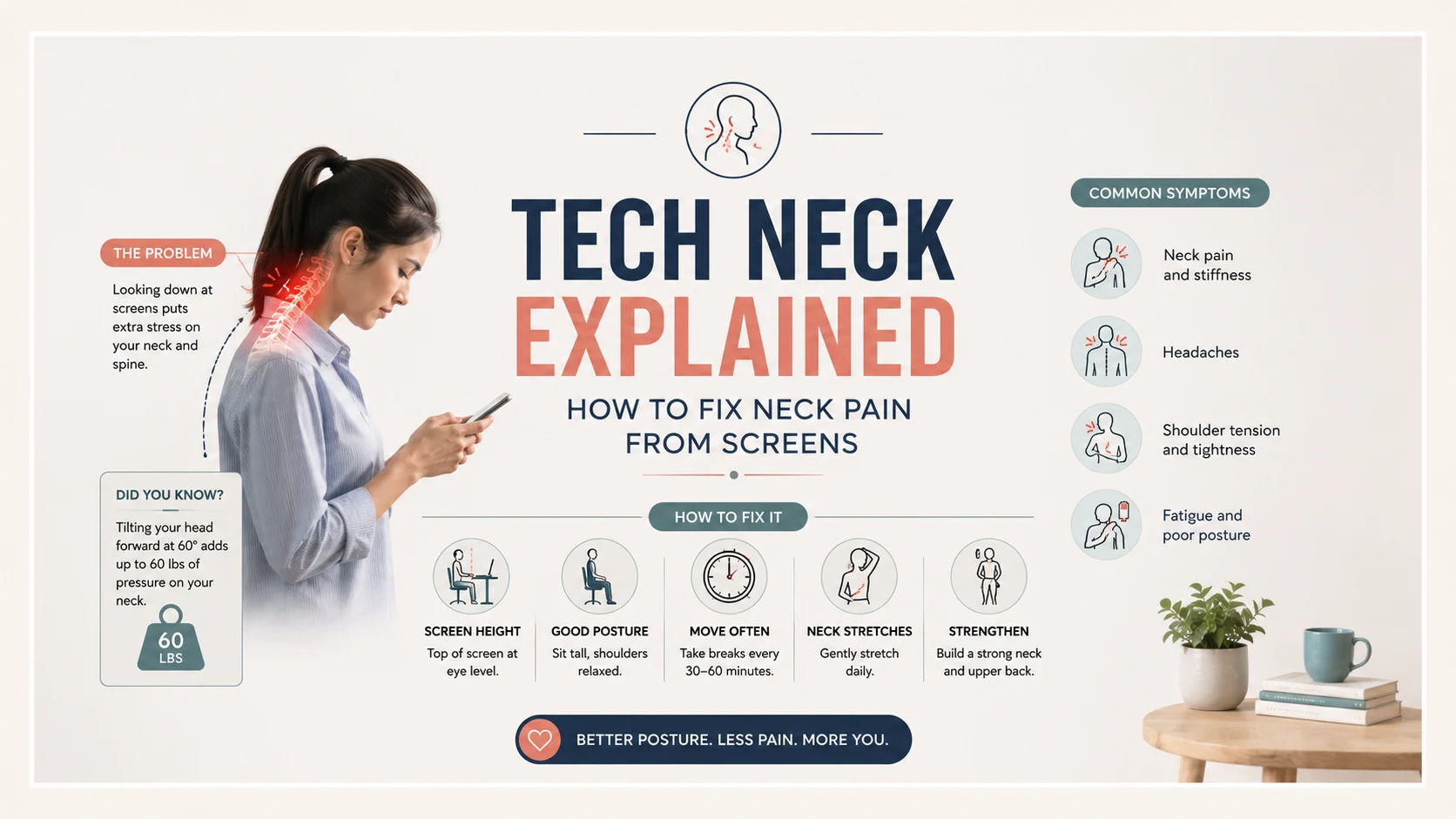
Tech Neck Explained: How to Fix Neck Pain From Screens
If you spend most of your day looking at a laptop, phone, or monitor, there is a good chance your neck has started complaining about it. Maybe it is a dull ache by evening. Maybe it is stiffness when you turn your head. Maybe it has even started creeping into headaches.
This is tech neck, and it has quietly become one of the most common physical complaints among people who work on screens, students, and frankly, anyone who owns a smartphone. The good news is that tech neck is largely reversible once you understand why it happens and what actually fixes it, as opposed to what just feels temporarily good.
What Is Tech Neck?
Tech neck, sometimes called "text neck," refers to neck pain and postural strain caused by repeatedly looking down at screens, whether that is a phone, laptop, or tablet, for extended periods.
In simple terms, your head is heavy. It weighs roughly 4.5 to 5.5 kilograms in a neutral position. But when you tilt your head forward to look down at a screen, the effective load on your neck muscles increases dramatically, because of the change in angle and leverage.
Here is the part most people do not realise: at a 60-degree forward tilt, which is roughly how far most people lean over their phones, the effective strain on the neck can feel like supporting 27 kilograms, nearly five times the head's actual weight. Hold that position for hours a day, every day, and it is no surprise the neck and upper back start to ache.
Why Tech Neck Has Become So Common
A few decades ago, looking down for long periods was rare. Today, looking down is the default position for huge parts of the day. Consider how much screen-related forward head posture has crept into daily life:
- Checking your phone first thing in the morning
- Scrolling during commutes
- Working on a laptop for 8+ hours
- Watching videos while lying down or slouched on a sofa
- Texting and messaging throughout the day
Each of these moments individually seems harmless. Added together across a day, and repeated for months or years, they create a strong, consistent pull on the neck and upper back muscles, gradually shifting your resting posture forward.
Symptoms of Tech Neck
Tech neck does not just show up as neck pain. It can present in several connected ways, which is part of why people often do not connect their symptoms back to screen posture.
- Persistent neck stiffness or soreness, especially by evening
- Tension headaches, particularly at the base of the skull
- Tightness or pain between the shoulder blades
- Rounded shoulders and a forward-leaning head posture
- Reduced range of motion when turning the head side to side
- In more advanced cases, tingling or numbness in the arms, caused by nerve compression in the neck
Important: If you are experiencing numbness, tingling, or pain radiating down your arm, this goes beyond typical tech neck and is worth discussing with a doctor, since it can indicate nerve involvement that needs proper evaluation.
How Tech Neck Affects More Than Just Your Neck
This is the part most articles skip. Tech neck rarely stays contained to the neck alone.
When your head juts forward repeatedly, your body compensates elsewhere. Your upper back rounds to support the new center of gravity. Your shoulder blades drift forward and your chest muscles tighten while your upper back muscles weaken and overstretch. Over time, this can contribute to:
- Reduced lung capacity, since a rounded upper back restricts how fully your ribcage can expand
- Jaw tension, since forward head posture changes the alignment of the jaw and can worsen teeth grinding or TMJ discomfort in some people
- Lower back compensation, as the body shifts weight distribution to balance the forward-leaning upper body
This is why fixing tech neck is not just about stretching the neck itself. It usually requires addressing the entire upper body posture chain. See Mobility Training for more on building a resilient posture chain.
How to Fix Tech Neck: A Step-by-Step Approach
Step 1: Raise Your Screen, Don't Lower Your Head
The single highest-impact fix is adjusting your screen height so your eyes meet the top third of the screen without tilting your head down. For laptops, a simple stand or even a stack of books works. For phones, try holding the device higher, closer to eye level, rather than bringing your head down to it.
Step 2: Do Targeted Neck and Upper Back Exercises
| Exercise | What It Targets | How Often |
|---|---|---|
| Chin tucks | Strengthens deep neck flexors, reverses forward head posture | 2 sets of 10, daily |
| Doorway chest stretch | Loosens tight chest muscles pulling shoulders forward | Hold 20-30 seconds, 2-3 times daily |
| Wall angels | Strengthens upper back and shoulder muscles | 2 sets of 10, 3-4 times a week |
| Neck side bends | Releases tension in the side neck muscles | Hold 15-20 seconds each side, daily |
| Prone Y raises | Strengthens upper back, counters rounded shoulders | 2 sets of 12, 3 times a week |
Step 3: Set Hourly Posture Reminders
Tech neck builds up gradually through repeated, unnoticed forward head positions across the day. A simple phone reminder every hour to sit up and pull your chin back gently can interrupt this pattern before it sets in deeply.
Step 4: Strengthen Your Upper Back, Not Just Your Neck
A weak upper back is often the real root cause of tech neck, since it is the upper back's job to hold the shoulders and head in a stable, upright position. Neck stretches alone provide temporary relief, but lasting improvement usually requires strengthening exercises for the mid and upper back, like rows and reverse flys. Read more in Strength Training.
Step 5: Adjust Your Sleep Position
Sleeping on your stomach, or with too many pillows propping your head forward, can add to neck strain accumulated during the day. Side or back sleeping with proper neck support generally gives the neck muscles a better chance to recover overnight. Related: Sleep and Hormones.
Related reading: stretches that undo hours of sitting.
Tech Neck in the Indian Context: Phones, Commutes, and Long Work Hours
Tech neck has a particularly strong presence in India for a few specific reasons worth understanding.
India has one of the highest rates of smartphone usage in the world, with many users spending several hours a day on their phones for work, messaging, social media, and entertainment, often in addition to laptop-based work hours. This compounding screen time, phone plus laptop, creates a higher cumulative forward head posture load across the day compared to populations relying mainly on a single device.
Long commutes on public transport, common in cities like Mumbai, Delhi, and Bengaluru, also tend to involve significant phone use while seated in postures that are far from ergonomic, often hunched over a phone for 45 minutes to over an hour each way. This commute-related screen time is sometimes overlooked entirely when people think about their daily "screen exposure," yet it can add substantially to the cumulative strain on the neck.
Also, many Indian offices, especially smaller companies or older office buildings, may not provide ergonomically adjustable chairs, monitor stands, or sit-stand desks as standard, making the simple but effective fix of raising your screen height something employees often need to arrange for themselves using a stack of books, a laptop stand, or a similar low-cost solution.
Setting Up an Ergonomic Workstation to Prevent Tech Neck
Beyond exercises and stretches, the actual setup of your workstation plays a significant preventive role. A few key adjustments make a meaningful difference:
Point 1: Monitor height: the top of your screen should be roughly at or slightly below eye level, so your gaze falls naturally without tilting your head down or craning it upward. Point 2: Monitor distance: position your screen about an arm's length away, close enough to read comfortably without leaning forward. Point 3: Chair height and back support: your feet should rest flat on the floor with knees roughly level with your hips, and your lower back should be supported, ideally with a small cushion if your chair lacks built-in lumbar support. Point 4: Keyboard and mouse position: keep them close enough that your elbows stay near your sides at roughly a 90-degree angle, rather than reaching forward, which often pulls the shoulders and head forward along with it.
Getting this setup right does not eliminate the need for the exercises and posture habits covered in this article, but it significantly reduces how hard your body has to work against gravity and bad positioning all day, every day.
For more on this, read our article on staying active with a desk job.
How Long Does It Take to Fix Tech Neck?
This depends on how long the posture pattern has been in place and how consistently you apply corrections. As a general guide:
- Mild, recent tech neck: noticeable improvement within 2 to 3 weeks of consistent correction
- Moderate, several months of poor posture: meaningful improvement within 6 to 8 weeks
- Long-standing tech neck, over a year: improvement is still very possible, but may take 3 months or more of consistent strengthening and posture correction, sometimes alongside physiotherapy
Patience matters here. The posture pattern took months or years to build, so expecting it to reverse in a few days of stretching is unrealistic.
Common Mistakes When Trying to Fix Tech Neck
- Only stretching, never strengthening. Stretching tight muscles without strengthening the weak ones supporting good posture leads to short-term relief but no lasting change.
- Fixing posture at the desk but ignoring phone use. Many people correct their laptop setup but continue looking down at their phone for hours, undoing the benefit.
- Expecting a pillow or neck brace to solve it. These can offer temporary comfort but do not address the underlying muscular imbalance.
- Doing exercises with poor form. Chin tucks and wall angels done incorrectly provide little benefit and can occasionally cause more strain. See Workout Form for more on why form matters.
- Ignoring the problem until it becomes painful. Mild stiffness is the easiest stage to correct. Waiting until there is significant pain usually means a longer recovery process.
When to See a Doctor for Tech Neck
Most tech neck cases improve with consistent posture correction and targeted exercise. However, you should consult a doctor or physiotherapist if you experience:
- Pain that does not improve after a few weeks of consistent correction
- Numbness, tingling, or weakness in the arms or hands
- Severe headaches that interfere with daily activity
- Neck pain following any injury, fall, or accident
How fitnoa Helps You Correct Tech Neck the Right Way
The hardest part of fixing tech neck is not knowing which exercises to do. It is doing them with correct form, consistently, over weeks. Most people give up because they are unsure if a chin tuck or wall angel is actually being done right, or they simply forget the daily exercises within a few days.
AI Posture Tracking
fitnoa's AI posture tracking directly addresses this gap. During live sessions, it tracks your form in real time, which is particularly valuable for posture-focused movements where small form errors, like an overextended chin tuck or uneven shoulder positioning, can reduce the benefit significantly.
Live Trainer Guidance
Because trainers guide every session live, they can also observe your posture patterns beyond a single exercise and offer corrections that a recorded video simply cannot provide, something especially useful for people dealing with long-term forward head posture.
Goal-Based Programs
fitnoa's general fitness and mobility programs include structured upper back and shoulder strengthening routines, which, as covered above, are essential for lasting tech neck correction rather than relying on stretching alone.
Detailed Fitness Reports
Your post-session fitness report tracks accuracy and performance over time, giving you a clear, objective way to see whether your posture-focused training is genuinely improving week over week, rather than guessing based on how your neck feels on any given day.
To put this into practice with live expert guidance, explore fitnoa's yoga and holistic wellness program.
Key Takeaways
- Tech neck is caused by repeated forward head posture from looking down at screens, and the effective strain on the neck can be several times its actual weight.
- Symptoms often extend beyond the neck to the shoulders, upper back, and even breathing capacity.
- Fixing tech neck requires both stretching tight muscles and strengthening weak ones, particularly in the upper back.
- Improvement typically takes 2 to 8 weeks for mild to moderate cases, longer for long-standing posture issues.
- Persistent pain, numbness, or tingling should be evaluated by a doctor rather than self-treated.
Related reads you may find helpful
- Wrong Form is Killing Your Results: Here's How to Fix It at Home
- Strength Training for Beginners at Home: Complete Guide (No Gym Needed)
- Mobility Training: Why It Matters More Than You Think (Beginner Guide)
- How Sleep Affects Weight Loss and Hormones in Women
- Why You're Not Seeing Results From Your Workouts (And How to Fix It)
Frequently asked questions
Everything you need to know
Fix Tech Neck With Guided Form Correction
Stretches alone rarely fix tech neck for good. fitnoa's live sessions and AI posture tracking help you strengthen the right muscles with correct form, so your posture actually improves week after week.